




Apache Ignite 3 manages client connections so efficiently that the scaling limits common in database-style systems simply aren’t a factor.
The Question
A common capacity planning question we get from users is: "How many client connections can one Ignite node maintain?"
With traditional relational databases, the common knowledge is:
- Client connection is typically single-threaded and short-lived. "Open -> Do work -> Close" is the usual pattern.
-
The server can handle a limited number of concurrent connections.
- Postgres defaults to 100
max_connections. - Each connection has significant memory overhead (a few MBs).
- Postgres defaults to 100
- An external connection pool (like PgBouncer) is recommended to improve scalability.
Apache Ignite 3 is quite different:
- Client connections are long-lived, multiplexed, and thread-safe. Quite often, a single client connection is enough for the entire application lifetime.
- On the server side, each client connection has a small memory footprint (a few KB).
This approach with cheap long-lived connections provides low latency and great scalability for applications:
- The connection is always open and responds to queries immediately.
- Multiple queries can be executed concurrently over the same connection (multiplexing).
- No need for an external connection pool.
- Query metadata is cached by the client connection, improving performance for repeated queries.
Let's see how many concurrent client connections a single Apache Ignite 3 node can handle.
Testing Setup
Server
I'm going to use the binary distribution of Apache Ignite 3.1.0 for this test.
The default node configuration is good enough, the only thing I changed was the logging level in etc/ignite.java.util.logging.properties to reduce logging overhead.
Client
To establish the connections, I'm using the Ignite.NET client in a simple console app that connects to the server in a loop and keeps the connections open. After the loop we verify that all connections are still alive.
Full program is on GitHub: https://gist.github.com/ptupitsyn/86056d4143811ba5dde6b2d1704fa948
Ephemeral Port Exhaustion
In the program you can notice the trick with multiple localhost addresses (127.0.0.1, 127.0.0.2, etc). Without it, after about 28k connections, the program fails with a
SocketException (99): Cannot assign requested address.
Basically, every TCP connection has a source IP:port pair and the port is chosen from the ephemeral port range (typically 32768–60999 on Linux). We can't have more connections on the same address than the
number of ephemeral ports available. Using multiple localhost addresses works around this limitation.
Results
I'm starting to get weird errors and timeouts at about 250k (yes, 250 thousand) connections with default settings. At 200k connections the system is stable and responsive, so I decided to stop the test there.
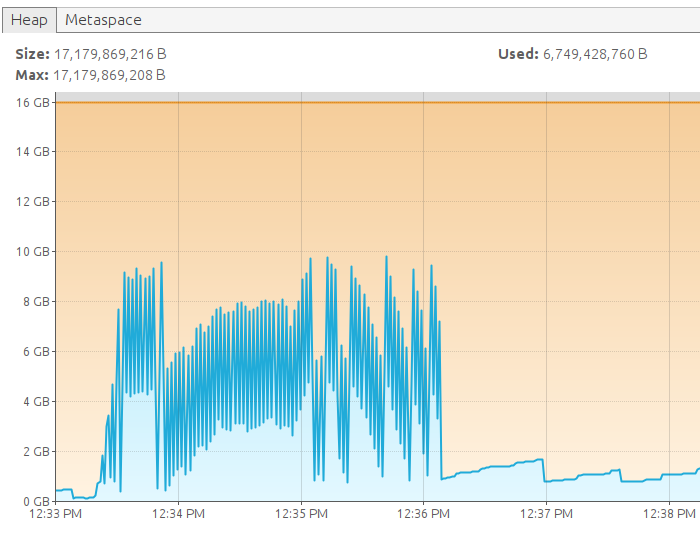
Initial memory usage of the Apache Ignite node was about 200 MB, and with 200k active connections it was about 900 MB after a full GC — about 3.5 KB per connection.
VisualVM screenshot:
Client log:
Connected 200000 connections in 00:02:49.2601996
Verified connectivity in 00:00:09.1446883
Note that each connection exchanges a heartbeat message every 10 seconds, so the system is not completely idle. We have about 20k small requests per second, but this barely requires any CPU.
Conclusion
Apache Ignite client connections are very lightweight, so open as many as your application requires and keep them open for the best performance!