Durable Memory
Apache Ignite is based on the
The durable memory architecture helps achieve the performance and scale of in-memory computing together with the disk durability and strong consistency in one system.
Ignite's Durable Memory operates in a way similar to the Virtual Memory of operating systems such as Linux. However, one significant difference between these two is that the Durable Memory, in addition to keeping the whole or partial data set in memory, always keeps the whole data set with indexes on disk (assuming that Ignite Native Persistence is enabled), while Virtual Memory uses the disk when it runs out of RAM, for swapping purposes only.
| Mode | Description |
|---|---|
| In-Memory |
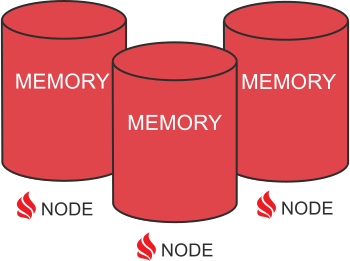
The whole data set is stored in memory. In this scenario, you can achieve the maximum performance possible because the data is never written to disk. To prevent possible data loss when a single cluster node fails, it is recommended to configure a number of backup copies (aka. replication factor) appropriately. Swap space can be used to prevent memory overflow. Use cases: in-memory caches, in-memory data grids, in-memory computations, web-session caching, real-time processing of continuous data streams. |
| In-Memory + 3rd party database |
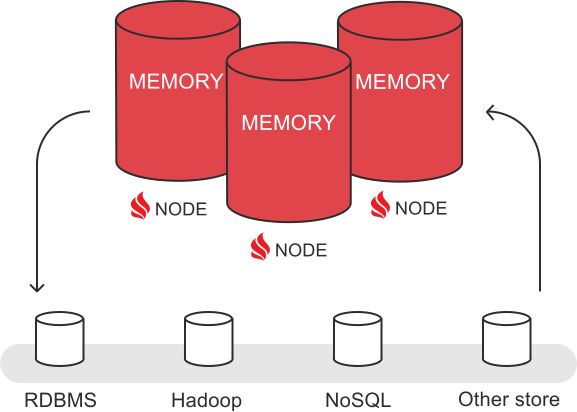
Ignite can be used as a caching layer (aka. data grid) above an existing 3rd party database - RDBMS, NoSQL, or HDFS. This mode is used to accelerate the underlying database. Automatic integration is provided with most of the known databases, like Oracle, MySQL, PostgreSQL, Apache Cassandra, etc. Use cases: Ignite as In-Memory Data Grid - adds acceleration and scale to existing database deployments (RDBMS, NoSQL, etc). |
| In-Memory + Full Copy on Disk |
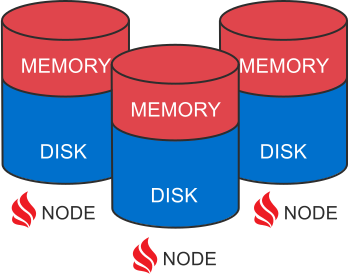
The whole data set is stored in memory and on disk. The disk is used for data recovery purposes in case of full cluster crashes and restarts. Ignite native persistence is used to store the data on disk.
Use cases: Ignite as an
|
| 100% on Disk + In-Memory Cache |
100% of data is stored in Ignite native persistence and smaller subset of data is cached in memory. The more data is cached in memory, the faster is the performance. The disk serves as the primary storage that survives any type of cluster failures and restarts. Use cases: Ignite as a Memory-Centric Distributed Database - provides cloud-native distributed database with SQL, key-value and collocated processing APIs. |
Ignite Native Persistence
Ignite Persistence is the most flexible, scalable, and convenient way of persisting data in Ignite. It is widely used in scenarios where applications need a distributed memory-centric database
Ignite native persistence is a distributed, ACID, and
Following are the advantages and characteristics of Apache Ignite as a platform when Durable Memory and Ignite Native Persistence are used together:
- Off-Heap memory
- Removes noticeable GC pauses
- Automatic Defragmentation
- Predictable memory consumption
- Boosts SQL performance
- Optional Persistence
- Support of flash, SSD, Intel 3D Xpoint
- Stores superset of data
- Fully Transactional
- Write-Ahead-Log (WAL)
- Instantaneous Cluster Restarts
3rd Party Persistence
Ignite can be used as a caching layer (aka. data grid) above an existing 3rd party database - RDBMS, NoSQL, or HDFS. This mode is used to accelerate the underlying database that persists the data. Ignite stores data in memory, distributed across multiple nodes providing fast data access. It reduces the network overhead caused due to frequent data movement between an application and the database. However, there are some limitations in comparison to the native persistence. For instance, SQL queries will be executed only on the data that is in RAM, thus, requiring to preload all the data set from disk to memory beforehand.
Swap Space
If you do not want to use Ignite native persistence or 3rd party persistence, you can enable swapping, in which case, Ignite in-memory data will be moved to the swap space located on disk if you run out of RAM. When swap space is enabled, Ignites stores data in memory mapped files (MMF) whose content will be swapped to disk by the OS depending on the current RAM consumption. The swap space is mostly used to avoid out of memory errors (OOME) that might happen if RAM consumption goes beyond its capacity and you need more time to scale the cluster out to redistribute the data sets evenly.