Ignite Clients
Ignite 3 clients connect to the cluster via a standard socket connection. Unlike in Ignite 2.x, there are no separate Thin and Thick clients in Ignite 3. All clients are 'thin'.
Clients do not become a part of the cluster topology, never hold any data, and are not used as a destination for compute calculations.
Client Connector Configuration
Client connection parameters are controlled by the client connector configuration. By default, Ignite accepts client connections on port 10800. You can change the configuration for the node by using the CLI tool at any time.
In Ignite 3, you can create and maintain configuration in either HOCON or JSON. The configuration file has a single root "node," called ignite. All configuration sections are children, grandchildren, etc., of that node. Here is what the client connector configuration looks like:
{
  "ignite" : {
    "clientConnector" : {
      "connectTimeoutMillis" : 5000,
      "idleTimeoutMillis" : 0,
      "listenAddresses" : "",
      "metricsEnabled" : false,
      "name" : "client_1",
      "port" : 10800,
      "sendServerExceptionStackTraceToClient" : false,
      "ssl" : {
        "ciphers" : "",
        "clientAuth" : "none",
        "enabled" : false,
          "keyStore" : {
            "password" : "********",
            "path" : "",
            "type" : "PKCS12"
        },
        "trustStore" : {
          "password" : "********",
          "path" : "",
          "type" : "PKCS12"
        }
      }
    }
  }
}
| Property | Default | Description | Changeable | Requires Restart | Acceptable Values |
|---|---|---|---|---|---|
| connectTimeoutMillis | 5000 | Connection attempt timeout, in milliseconds. | Yes | Yes | 0 - inf |
| idleTimeoutMillis | 0 | How long the client can be idle before the connection is dropped, in milliseconds. By default, there is no limit (0). | Yes | Yes | 0-2147483647 |
| listenAddresses | "" | Address (IP or hostname) to listen on. Listens on all interfaces if empty. | Yes | Yes | Valid IP address or host name |
| metricsEnabled | false | Defines if client metrics are collected. | Yes | Yes | true, false |
| name | client_{number} | Defines the unique client name. If not specified, generated automatically based on client number. | Yes | Yes | A valid string |
| port | 10800 | The port the client connector will be listening to. | Yes | Yes | 1024-65535 |
| sendServerExceptionStackTraceToClient | false | By default, only the exception message and code are sent back to the client. Set this property to true to include the full stack trace, which will appear as part of the client-side exception. Note: Not recommended for production: stack trace disclosure is a security weakness. | Yes | Yes | true, false |
| ssl.ciphers | "" | List of ciphers to enable, comma-separated. Empty for automatic cipher selection. | Yes | Yes | TLS_AES_256_GCM_SHA384, etc. (standard cipher ids) |
| ssl.clientAuth | none | Whether the SSL client authentication is enabled and whether it is mandatory. | Yes | Yes | none, optional, require |
| ssl.enabled | false | Defines if SSL is enabled. | Yes | Yes | true, false |
| ssl.keyStore.password | ******** | SSL keystore password. | Yes | Yes | A valid password |
| ssl.keyStore.path | Path to the SSL keystore. | Yes | Yes | A valid path | |
| ssl.keyStore.type | PKCS12 | Keystore type. | Yes | Yes | PKCS12, JKS |
| ssl.trustStore.password | ******** | Truststore password. | Yes | Yes | A valid password |
| ssl.trustStore.path | Path to the truststore. | Yes | Yes | A valid path | |
| ssl.trustStore.type | PKCS12 | Truststore type. | Yes | Yes | PKCS12, JKS |
Here is how you can change the parameters:
node config update clientConnector.port=10469
Client Connection
When Ignite client is starting (when the build() or buildAsync() method is called), it tries to connect to all configured endpoints one by one in the specified order, and returns as soon as one connection is established. If the client fails to connect to any nodes, the initialization fails.
Once the client connects to the cluster, it keeps attempting to connect to all other specified nodes in the background, and uses them as failover in case the connection to the primary node is interrupted. Client does not directly connect to nodes not specified in its configuration, but is aware of them through cluster topology and can send indirect write or read requests.
An inactive client sends periodic heartbeat messages to the cluster to confirm that it is still active and running. If no heartbeat messages are received for the duration specified in the idleTimeoutMillis configuration, the client will be disconnected. By default, the heartbeat interval is equal to half the idle timeout or 30 seconds, whichever is shorter.
Partition Awareness
As data in the cluster is distributed between the nodes, the client can improve throughput by immediately sending updates and read requests to target nodes holding the data.
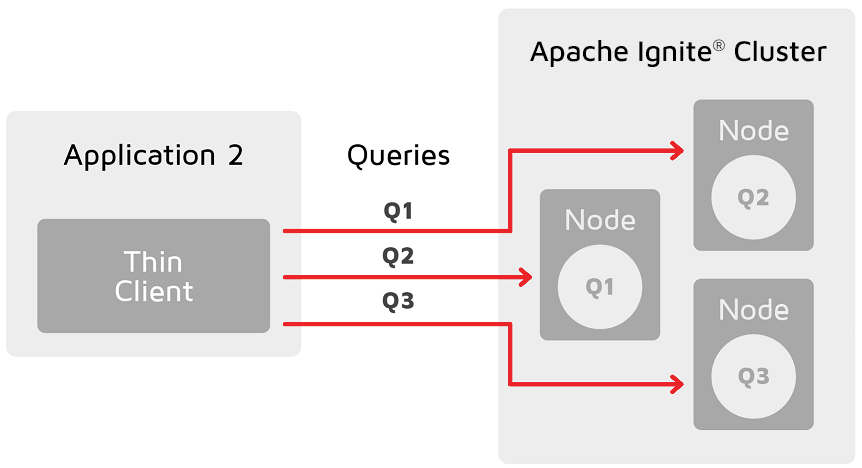
For each key that needs updating, the client will get the name of the node holding its primary partition and then send an update directly to this node. If there is an active connection to this node, the update will be sent directly to it. Otherwise, the update will be sent to a random node on the list to be redirected to the target node. As such, it is recommended to list all cluster nodes in client configuration to reduce unnecessary network load.
Partition awareness assumes that the cluster is stable. Client receives information about cluster data assignments in the background, and it may be outdated by the time an update is sent. If it is, nodes will automatically redirect requests to correct nodes until data on the client is updated.
Limitations
-
Apache Ignite can only apply partition awareness optimization for queries over single partition of a single table.
-
DML queries, which cannot be rewritten to key-value operations, are not supported yet.
Apache Ignite can execute a query as key-value operation only if the query contains an equality condition on all key columns. Partition awareness will only work for DML queries if the query can be rewritten to a single key-value operation. The explain plan will containsKeyValueGetorKeyValueModifynode in that case. Bulk DML operations (likeINSERT FROM SELECTor multi-valueINSERT FROM VALUES) are not supported yet. -
Equality condition on colocation key columns is required.
Apache Ignite can only apply partition awareness optimization if the SQL query contains an equality condition on all colocated columns. This requirement allows the client to route the query to the node where the partition with the data resides. -
Partition awareness cache on client may miss required metadata.
Client nodes do not parse or execute queries by themselves, they require query metadata with colocation information from the server node to utilize partition awareness optimization. The query metadata is cached on client after the first query execution and can be used in later query runs. However, it also can be evicted due to cache eviction policies.
Seeorg.apache.ignite.client.IgniteClient.Builder#sqlPartitionAwarenessMetadataCacheSize()for more information.
How to Check if Partition Awareness is Applicable
You can verify whether partition awareness is used for a given SQL query by inspecting the EXPLAIN command results.
- The resulting plan should contain a
TableScannode with equality conditions on all colocation columns of the table:
TableScan
      table: PUBLIC.T
      predicate: AND(=(COLOCATION_COL_1, ?), =(COLOCATION_COL_2, ?))
- or a similar
IndexScanwhere the search bound has a prefix of all the colocation columns:
IndexScan
      table: PUBLIC.T
      predicate: AND(=(COLOCATION_COL_1, ?), =(COLOCATION_COL_2, ?))
      searchBounds: [ExactBounds [bound=?], ExactBounds [bound=?]]
- or
KeyValueGetnode:
KeyValueGet
    table: PUBLIC.T
    key: [?0]
- or
KeyValueModifynode:
KeyValueModify
    table: PUBLIC.T
    key: [?0]
Apache Ignite supports both literals and dynamic parameters in equality conditions for partition awareness purposes.
Examples
Assuming a table T is defined as:
CREATE TABLE T (
    id INT NOT NULL,
    region_id INT NOT NULL,
    customer_id INT NOT NULL,
    val VARCHAR,
    PRIMARY KEY (id, region_id, customer_id)
) COLOCATE BY (region_id, customer_id);
The following queries can utilize partition awareness optimization:
SELECT * FROM T WHERE region_id =? AND customer_id = ?

DELETE FROM T
WHERE id = ? AND region_id = ? AND customer_id = ?;

INSERT INTO T (id, region_id, customer_id, val)
VALUES (?, ?, ?, ?);
While these queries will not utilize partition awareness:
// Missing condition for colocation column `customer_id`.
SELECT * FROM T WHERE region_id =?

// Non-equality condition on colocation column.
SELECT * FROM T WHERE region_id = ? AND customer_id > ?
In more complex cases (nested queries, IN condition, JOINS), partition awareness is not guaranteed to work. It depends on whether the query can be rewritten in a form which contains sufficient information to locate the data.
Client Features
The following table outlines features supported by each client.
| Feature | Java | .NET | C++ |
|---|---|---|---|
| Record Binary View | yes | yes | yes |
| Key-Value Binary View | yes | yes | yes |
| Record View | yes | yes | yes |
| Key-Value View | yes | yes | yes |
| SQL API | yes | yes | yes |
| Partition Awareness | yes | yes | No |
| Transactions | yes | yes | yes |
| Compute API | yes | yes | yes |
| Retry Policy | yes | yes | No |
| Heartbeats | yes | yes | yes |
| Data Streamer | yes | yes | No |